

Introduction
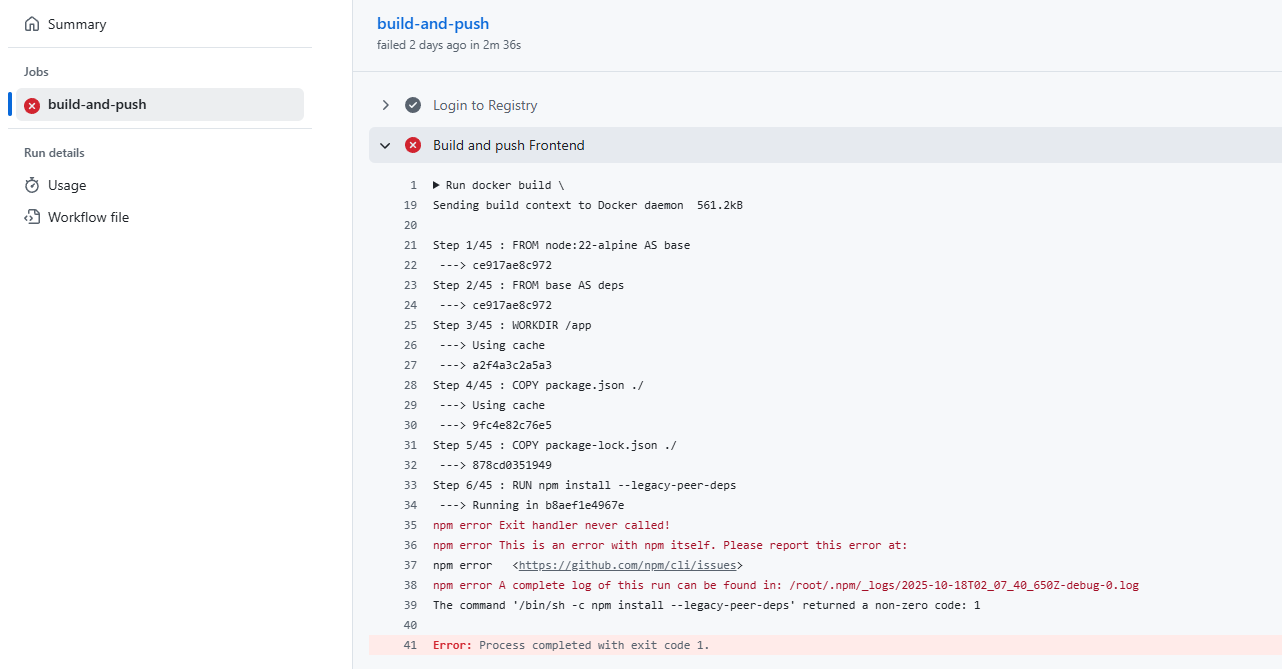
Have you encountered the “npm error Exit handler never called!” in your GitHub Action? It’s a frustrating issue that can halt your workflow execution unexpectedly. This post delves into understanding why this error occurs and how to effectively resolve it.
error: ---> Running in 44d17f6484e3
npm error Exit handler never called!
npm error This is an error with npm itself.
Please report this error at: npm error <https://github.com/npm/cli/issues>
npm error A complete log of this run can be found in: /root/.npm/_logs/2025-10-18T04_48_30_916Z-debug-0.log
The command '/bin/sh -c npm ci' returned a non-zero code: 1
Exploring the Common Explanations
Upon researching this issue, you might discover that it is often attributed to resource or environment constraints within the build container, such as low memory or concurrency problems in npm. However, these are not usually the root causes.
Investigating the Root Cause
In recent experiences, it became evident that the setup of the Dockerfile was not to blame. Whether your Dockerfile resembles this:
# Use Node.js LTS version
FROM node:22-alpine AS base

# Install dependencies only when needed
WORKDIR /app

# Copy package files
COPY package.json ./

# Install dependencies
RUN npm install --legacy-peer-deps
Or this:
# Build stage
FROM node:20-alpine AS builder

WORKDIR /app

# Copy package files
COPY package.json package-lock.json* ./

# Clear npm cache and install dependencies
RUN npm cache clean --force && \
    rm -rf node_modules && \
    npm ci --no-audit --no-fund --silent && \
    npm list next --depth=0
Both configurations are not the root causes. The real issue lies with the self-hosted GitHub runner. The simplest solution involves reconfiguring your GitHub runner on the server.
Uninstalling the GitHub Runner
To uninstall the GitHub runner, you can use the following command:
ps -aux | grep '.run.sh'
Look for the process line with /bin/bash ./run.sh and terminate it using:
kill <process id>
Replace <process id> with the actual process ID found next to the username (e.g., ‘ubuntu’).
Reinstalling the GitHub Runner
Now, let’s proceed with reinstalling the GitHub runner. Here is a simple guide I added another day: How to Set Up a Self-Hosted GitHub Runner on Ubuntu
This proactive approach will save hours you might otherwise spend debugging.
Enjoyed this article? Support my work with a coffee ☕ on Ko-fi.

