
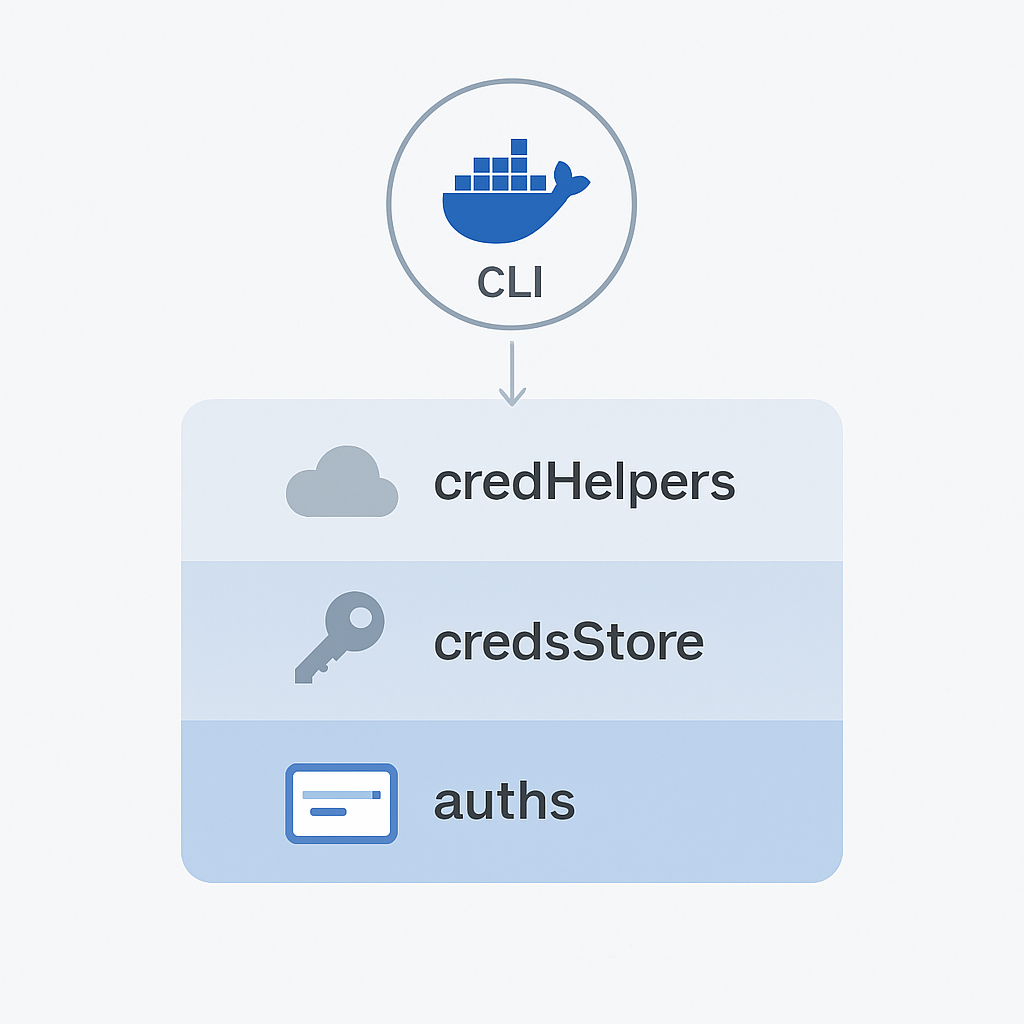
If you build your own container manage system when integrating docker client library, you may also encounter issues with credential resolution. If you system maintain the registry credential, it is easy to assume that authentication will “just work” once credentials are configured in your platform. But behind the scenes, Docker follows a specific and sometimes confusing logic for how it locates and uses credentials.
This post explains that behavior in depth and highlights one of the most common causes of authentication issues developers face when using the Docker client as part of a backend or automation workflow.
How Docker Stores and Retrieves Credentials
Docker manages authentication through a configuration file located at:
~/.docker/config.json
This file is created automatically when the Docker CLI runs for the first time. It may include different keys such as auths, credsStore, credHelpers, and currentContext.
A typical example on macOS might look like this:
{
  "auths": {},
  "credsStore": "osxkeychain",
  "currentContext": "orbstack"
}
This file tells Docker how to retrieve registry credentials and which context it should use when executing commands.
The Priority Order of Credential Resolution
When Docker tries to authenticate with a registry (for example, during docker pull or docker push), it looks for credentials in the following order:
- credHelpers – Registry-specific helpers (like
docker-credential-gcloudordocker-credential-ecr-login) - credsStore – A global credential store used for all registries
- auths – Inline credentials defined directly in
config.json
This priority matters. Once Docker finds a valid credential source, it will not continue checking the others. This can create subtle issues when different tools or environments manage credentials differently.
Real Example: The Global credsStore Trap
On macOS and Windows, Docker Desktop automatically sets a global credsStore in the configuration file.
For macOS, this is osxkeychain, and for Windows, it is desktop.exe. These stores rely on system-level keychains to hold login information.
If the global credsStore exists but does not contain credentials for a specific registry, Docker will still try to use it. It will not automatically fall back to credentials that are defined elsewhere, such as inline auths that your integration programmatically injects.
This is why many developers see behavior like:
Error response from daemon: pull access denied for <registry>, repository does not exist or may require 'docker login'
even though their code clearly provides valid credentials.
Why Linux Environments Behave Differently
Most Linux installations do not configure a global credsStore by default.
Instead, they rely entirely on auths entries stored directly in config.json after running docker login.
Because of that, this credential issue tends to appear only on macOS and Windows environments where Docker Desktop adds its own credential helper setup automatically.
What Happens When You Run docker login
When you execute docker login, Docker saves your credentials in one of two places:
- If a global
credsStoreis configured, credentials are written into that store. - If not, the credentials are stored inline under
authsinconfig.json.
This design allows Docker to delegate credential management to the operating system, but it also means that other programs using the Docker client cannot easily override that behavior.
If your application or script relies on injecting credentials dynamically, Docker might ignore them if a global credsStore already exists. It will look at the credsStore first and fail immediately if that store does not contain entries for your target registry.
How to Work Around This Behavior
If you are building software or workflows that depend on Docker under the hood, you can control this behavior by managing the configuration file programmatically before executing any Docker commands.
When you detect that your system already has valid inline credentials for one or more registries, you can remove or clear the credsStore entry from the configuration.
This ensures that Docker will use the inline credentials you provide instead of relying on an empty or unrelated global store.
If there are no inline credentials, you can keep the credsStore so Docker can still use it as a fallback for interactive users.
Understanding credHelpers
The credHelpers field is another piece of Docker’s credential logic. It allows per-registry credential management using binaries named docker-credential-<helper>.
For example:
docker-credential-gcloudis installed with Google Cloud SDK.docker-credential-ecr-logincomes with the AWS CLI.docker-credential-ghis installed with GitHub CLI.
These helpers are not installed automatically with the Docker client itself. They appear only if the user installs a corresponding cloud CLI or plugin.
When present, Docker will always use them first, because they have the highest priority in the credential resolution order.
Key Takeaways
- Docker does not use a single consistent source for credentials. It follows a defined priority chain:
- macOS and Windows often include a global credsStore by default. Linux usually does not.
- If your application injects credentials dynamically, a global credsStore can cause unexpected authentication failures.
- Removing or clearing the credsStore in these cases lets Docker use the credentials you provide directly.
- Per-registry helpers always take priority if they exist. They must be installed separately through cloud SDKs or credential plugins.
Final Thoughts
Docker’s credential system was designed to balance security, flexibility, and multi-platform support. However, that flexibility can become a problem when Docker is used as a background layer in larger software systems or automation pipelines.
Understanding how Docker resolves credentials allows developers to predict its behavior and avoid hard-to-debug authentication errors.
By explicitly managing the config.json file and knowing when to override or clear the credsStore, developers can ensure reliable authentication across all environments and prevent “missing credentials” issues before they happen.
Enjoyed this article? Support my work with a coffee ☕ on Ko-fi.

