
1. Introduction
If you use Traefik as the reverse proxy in a Docker Swarm cluster, and your application is server-side rendered (SSR), you may encounter the following issue:
- You can log in successfully
- But when you refresh the page or navigate to another page, you are suddenly logged out
- The behavior feels random: sometimes it works, sometimes it doesn’t
This issue usually does not appear:
- when running the app locally
- when using only one container
- before scaling the service in Docker Swarm
Once you add multiple replicas, the problem starts to show up. This post will explore the reasons behind this behavior and how to effectively address it.
2. Why this issue happens
The logout issue you’re experiencing in a Traefik-powered Docker Swarm setup arises from how SSR applications store sessions and how Docker Swarm and Traefik route requests. Most SSR applications handle login by authenticating users, storing session data in the server’s memory, and sending a session ID as a cookie to the user’s browser. When only one server is involved, subsequent requests can easily retrieve this session data. (If you want to understand more about cookies and sessions, read How Web Authentication (Cookies, Sessions, JWT) Actually Works.)
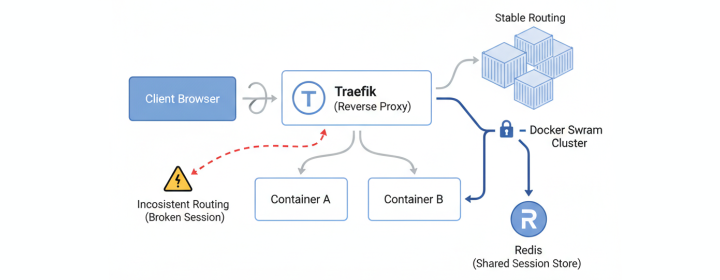
In a Docker Swarm environment, multiple replica services operate independently. Traefik distributes the requests among these replicas, each with its own memory space. This distribution leads to inconsistent session handling since session data stored in one replica is not visible to others. Therefore, a scenario could unfold as follows:
When the client first logs in, Traefik routes it to Container A on Node A, where the session is created and stored in memory. The client receives a session cookie. When the client refreshes the page, Traefik may route the request to Container B on Node B. From Container B’s perspective, the session does not exist, resulting in the user being logged out after a refresh or navigation. This randomness is due to the independent routing of requests.
3. How to fix the issue by updating Traefik labels
One quick way to fix this is to enable sticky sessions in Traefik. Sticky sessions tell Traefik to keep routing the same client to the same container in order to maintain the session data.
In a Docker Swarm environment, this is achieved by adding sticky.cookie configurations to your service’s labels. Here’s how it can be done:
1labels:
2	- traefik.enable=true
3	- traefik.http.routers.myapp.rule=Host(`example.com`)
4	- traefik.http.services.myapp.loadbalancer.server.port=3000
5
6	# Enable sticky sessions (session affinity) to ensure same client hits same replica
7	# This is critical for in-memory session stores with multiple replicas
8	- traefik.http.services.myapp.loadbalancer.sticky.cookie=true
9	- traefik.http.services.myapp.loadbalancer.sticky.cookie.name=myapp-session
With this configuration, Traefik sets a cookie binding the client to a single replica, ensuring consistent session management. This effectively solves the issue of unsynchronized sessions.
4. What does sticky.cookie do? (and its drawbacks)
With sticky sessions enabled, client requests are routed consistently to a single container:
This approach solves the login issue; however, it comes with several drawbacks:
- Container Failure: If the container to which requests are pinned fails, the session data is lost, requiring the user to re-login.
- Load Balancing Unevenness: The same container might be overloaded, while others are underutilized.
- Reduced Horizontal Scaling Effectiveness: Although more replicas mean more capacity, requests being tied to specific replicas can lessen the scaling advantage.
- Masking Underlying Architectural Issues: Sticky sessions are a temporary fix, not addressing the root cause of session handling inconsistencies.
Sticky sessions may be suitable for short-term fixes or smaller deployments but lack long-term viability.
5. A better long-term solution: use Redis
A more stable and scalable solution is to move session storage out of the container’s memory to a shared data store like Redis. Here’s how the request flow changes with Redis:
(shared session)"] F --> G A -->|Session ID| B
Benefits of using Redis include:
- No Container Dependencies: Any replica can handle any request as it fetches session data from Redis.
- Session Persistence: Sessions persist beyond container restarts.
- No Sticky Sessions Required: This eliminates the need for sticky sessions.
- Decoupled Architecture: Separating session management from application logic enhances maintainability. If reverse proxy solution is updated or changed, session handling remains unaffected.
- Better Scaling and Reliability: Improves the system’s overall scalability and reliability through centralized session management.
This approach is recommended for a robust production-ready deployment, offering a more reliable solution for managing sessions across a distributed environment.
6. Final takeaway
The logout issue you encounter when refreshing pages in SSR applications within Traefik and Docker Swarm is not due to an error in Traefik or cookie configuration, but rather the result of fragmented session management due to independent request routing and isolated memory spaces of Docker Swarm replicas.
While sticky sessions with sticky.cookie can alleviate the issue temporarily, implementing a shared session store like Redis offers a more scalable and reliable solution. For deeper insights into cookies and server-side sessions, consider reading How Web Authentication (Cookies, Sessions, JWT) Actually Works. This understanding will elevate how you manage applications in distributed environments, reducing issues and enhancing efficiency.
Enjoyed this article? Support my work with a coffee ☕ on Ko-fi.

