

Setting up your own Docker registry using tools like Harbor can be incredibly satisfying. However, one common problem you may encounter is:
x509: certificate signed by unknown authority
If you’re tempted to blame a server misconfiguration or your reverse proxy, hold that thought. The issue usually stems from the client not recognizing the Certificate Authority (CA) that signed the server’s certificate. Let’s dive into why this happens and how to set things right.
Understanding the TLS Trust Chain
TLS (Transport Layer Security) does more than just encrypt your data - it also verifies who you’re communicating with. When you connect to a server, your client wants to confirm: “Are you really who you claim to be?” The server’s job is to present a certificate as proof.
The catch? The client only trusts certificates signed by CAs in its own trusted store. If the signing CA is absent from the client’s trust store, certificate verification fails and the connection is rejected, leading to the dreaded x509 error. This process is essential for secure online interactions.
Why Public Websites Work?
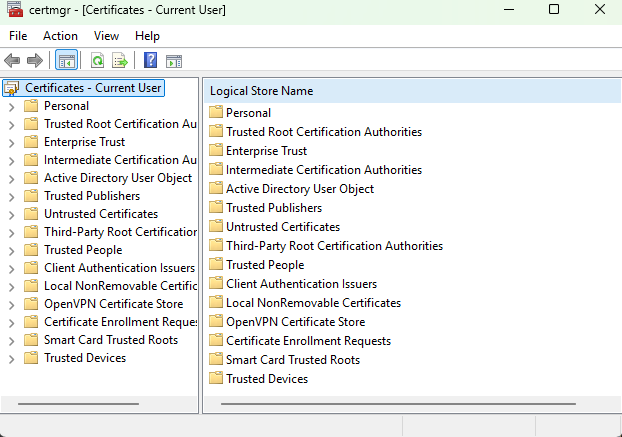
Platforms like GitHub and Google breeze through this process because their certificates are backed by widely recognized public Certificate Authorities (CAs). Systems like Windows maintain a list of these trusted CAs - DigiCert and Let’s Encrypt, to name a couple. Since these CAs are trusted, your browser quietly accepts the connection without any extra setup. For example, you can find your system’s trusted CAs in Windows under certmgr.msc or on Linux in /etc/ssl/certs/ca-certificates.crt.
Why Certificates Signed by a Private CA Are Different?
If you’re running a self-hosted registry, you might use your own CA to sign its certificate. Picture “MyCompany Root CA” acting as your private authority. Unlike public CAs, this private CA is not included in standard trust stores by default.
As a result, clients will reject certificates signed by it unless the private CA has been explicitly trusted. The problem is not necessarily with the server certificate itself. It is that the client cannot establish a chain of trust to the CA that signed it.
A Harbor Example: How the Trust Failure Happens
Suppose Harbor is deployed behind Nginx with the following configuration:
- Nginx acts as a reverse proxy and handles TLS termination.
- Harbor communicates with Nginx internally over HTTP.
- Nginx presents a certificate for
harbor.example.com. - An internal CA named
MyCompany Root CAsigns that certificate.
The resulting request path and certificate relationship look like this:
(TLS Client)"] Nginx["Nginx
(TLS Termination)"] Harbor["Harbor Registry"] CA["MyCompany Root CA"] Daemon -->|"HTTPS"| Nginx Nginx -->|"HTTP"| Harbor CA -.->|"Signs Nginx Certificate"| Nginx classDef docker fill:#dbeafe,stroke:#2563eb,color:#1e3a8a,stroke-width:2px classDef proxy fill:#e0e7ff,stroke:#7c3aed,color:#312e81,stroke-width:2px classDef registry fill:#e2e8f0,stroke:#475569,color:#1e293b,stroke-width:2px classDef ca fill:#f3e8ff,stroke:#9333ea,color:#581c87,stroke-width:2px class Daemon docker class Nginx proxy class Harbor registry class CA ca linkStyle default stroke:#7c3aed,color:#7c3aed,stroke-width:2px
The diagram above shows the registry architecture, but one detail is crucial to understanding the x509 error: which component acts as the client in the TLS connection?
The Key Detail: The Docker Daemon Is the TLS Client
The user runs
docker pull, but the Docker daemon, not the Docker CLI, connects to the registry and verifies its certificate.
When a user runs:
docker pull harbor.example.com/my-image:latest
the request follows three main steps:
- The Docker CLI sends the pull request to the Docker daemon, normally through
/var/run/docker.sock. - The Docker daemon establishes the HTTPS connection to Nginx.
- The Docker daemon verifies the certificate presented by Nginx against its trusted CAs.
Therefore, the certificate must be trusted by the Docker daemon, because it is the TLS client.
Now suppose MyCompany Root CA is missing from the daemon’s trusted certificates:
Why it fails: The certificate may have the correct hostname and a valid signature, but the Docker daemon cannot build a chain of trust to a known CA. It aborts the TLS handshake before Harbor receives the request.
Where Does the Docker Daemon Look for Trusted CAs?
Because the Docker daemon performs the certificate verification, the internal CA must be available to the daemon.
For a standard Docker Engine installation on Linux, the daemon can obtain trusted CAs from two relevant locations:
| Certificate location | Trust scope |
|---|---|
| Machine-wide system CA store | Docker and other applications on the machine |
/etc/docker/certs.d/<registry-host>:<port>/ca.crt |
A specific Docker registry |
The machine-wide CA store can be used when the internal CA should be trusted by multiple applications on the system.
Docker also provides a registry-specific certificate directory:
/etc/docker/certs.d/<registry-host>:<port>/ca.crt
For example:
/etc/docker/certs.d/harbor.example.com/ca.crt
This directory makes the CA available to the Docker daemon while limiting the additional trust to the relevant registry. It avoids extending trust in the internal CA to every application on the machine.
For this Harbor deployment, the registry-specific directory is therefore the more focused choice.
Now that we know where the Docker daemon looks for trusted CAs, we can install the internal CA.
Solution: Install the CA Certificate for the Docker Daemon
To solve this issue, install the internal CA certificate in the Docker daemon’s registry-specific trust directory:
- Create the necessary directory:
sudo mkdir -p /etc/docker/certs.d/harbor.example.com
- Install the CA certificate:
sudo cp ca.crt /etc/docker/certs.d/harbor.example.com/ca.crt
- Restart Docker:
sudo systemctl restart docker
With this configuration, the Docker daemon can find the internal CA in its registry-specific trust store and verify the certificate presented by Nginx. After restarting Docker, the x509: certificate signed by unknown authority error should be resolved. There is normally no need to change the Harbor or Nginx configuration.
Why Install the CA Instead of the Server Certificate?
Installing a CA, not just the server certificate, expands your trust boundaries. This approach means clients can verify multiple server identities under that CA, similar to how public CAs function. Tools like OneClickTLS can simplify the process of setting up your own CA and managing these certificates.
Why Not Use insecure-registries?
Opting for Docker’s insecure-registries setting bypasses TLS validation, opening doors to potential security threats like man-in-the-middle attacks. Installing the CA retains the complete TLS security benefits, ensuring your communications stay encrypted and verified.
Key Takeaways
When a self-hosted registry uses a certificate signed by a private CA, configuring TLS on the server is only half of the setup. The Docker daemon must also trust the CA that signed the certificate.
To avoid the x509: certificate signed by unknown authority error:
- Use a CA to sign the registry certificate.
- Add that CA to each Docker daemon’s trust configuration.
- Prefer
/etc/docker/certs.d/<registry>/ca.crtwhen the trust should apply only to a specific registry. - Avoid
insecure-registries, because it disables certificate verification.
With the correct trust configuration, Docker can securely communicate with self-hosted registries such as Harbor or GitLab without weakening TLS protection.
Enjoyed this article? Support my work with a coffee ☕ on Ko-fi.

