Buy Me a Coffee
Docker Credential Resolution Process

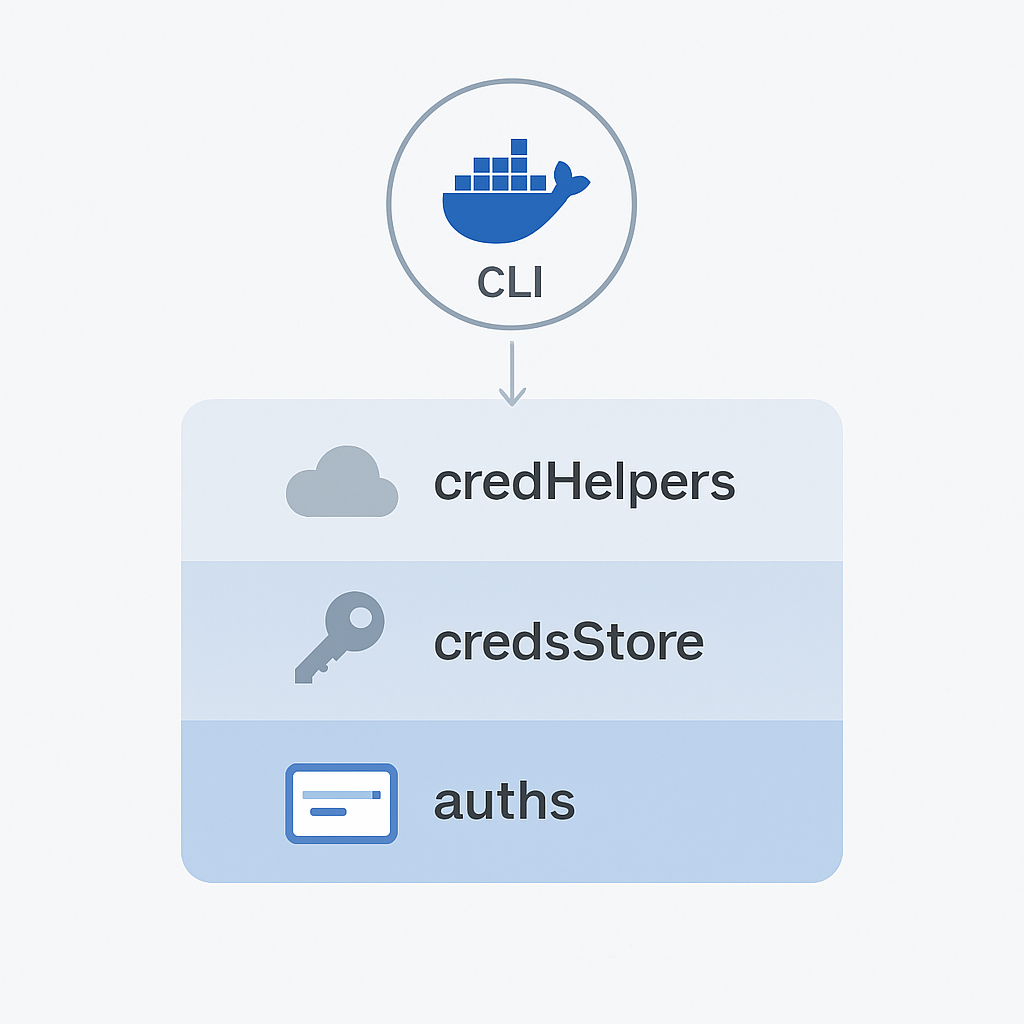
Understanding Docker Credential Resolution: A Deep Dive for Developers

If you build your own container manage system when integrating docker client library, you may also encounter issues with credential resolution. If you system maintain the registry credential, it is easy to assume that authentication will “just work” once credentials are configured in your platform. But behind the scenes, Docker follows a specific and sometimes confusing logic for how it locates and uses credentials. This post explains that behavior in depth and highlights one of the most common causes of authentication issues developers face when using the Docker client as part of a backend or automation workflow. ...

[NextCloud] Don't Panic: Updating NextCloud with the Command-Line Updater

Understanding the Error and Why It Occurs The message Please use the command-line updater because updating via browser is disabled in your config.php means NextCloud’s configuration file (config.php) is set to restrict browser-based updates. This is a security measure designed to prevent unauthorized or potentially malicious updates. Docker setups often implement this for added security. Step-by-Step Instructions 1. Access Your Docker Container First, you need to access your NextCloud Docker container’s shell. Let’s assume your NextCloud container is named nextcloud. Replace nextcloud with the actual name of your container. ...

Setting Up a GitHub Runner in DigitalOcean

[GitHubRunner] How to Set Up a Self-Hosted GitHub Runner in a DigitalOcean Droplet

Setting up a self-hosted GitHub Runner on a DigitalOcean droplet allows for more control and customization in your CI/CD pipelines. This guide walks you through creating a droplet using a Docker image, configuring GitHub secrets, and setting up a self-hosted runner in a few easy steps. 1. Setup DigitalOcean Droplet 1.1 Create a DigitalOcean Droplet Start by creating a droplet from the DockerImage marketplace on DigitalOcean. This pre-configured image includes Docker, so you won’t need to install it yourself. ...

Seatable SMTP Troubleshooting Guide

[Seatable] SMTP Configuration Issues in Self-Hosted Seatable

Problem When self-hosting Seatable using Docker, you might experience issues with your SMTP setup, even if you’re confident that your configuration is correct because it works on another platform. This might appear to be a bug, but there is a specific cause. Recently, a friend encountered this problem, and I was able to identify the root cause. Root Cause Seatable does not automatically refresh its email configuration from Docker Compose environment variables after the initial setup. ...

Docker Pull Flow Troubleshooting

[Docker/Registry] Troubleshooting Image Pull Failures in Self-Built Container Management Tool that Uses Docker Compose SDK

The Problem I’m building a container management tool using the Docker Compose SDK (link) and the Docker CLI library (link). One feature is the ability to deploy Docker Compose YAML files that reference images from private registries. To handle authentication, I added private registry credentials into my tool and injected them into the Docker client using the authConfig field during Compose service initialization. I expected Docker Compose to use these credentials when pulling images. ...

Docker Compose Bind Mount Issue

[Docker] Mounted Folder Becomes Empty After Redeploy in Docker Compose

If you’ve ever worked with Docker Compose and encountered a situation where your container suddenly can’t see any files in a previously working mounted folder, you’re not alone. This issue can be especially frustrating when everything seems to work fine on the initial deployment, only to break inexplicably after redeploy. The Problem When a folder is bind-mounted into a Docker container using Docker Compose, it works correctly during the initial deployment. However, after a redeploy — particularly when triggered by automation tools like Portainer — the mounted folder inside the container becomes empty. ...

Docker Swarm - Efficient container management with prune

[Docker] Understanding `docker stack deploy --prune` in Docker Swarm

When managing services in Docker Swarm mode, the --prune flag in docker stack deploy helps keep your stack synchronized with your compose file. It ensures that only the services defined in your current file remain running, and anything outdated is automatically cleaned up. What the --prune Flag Does When you run this command: docker stack deploy -c docker-compose.yml mystack --prune Docker compares your current stack with the new compose file and performs three actions: ...

parse json arguments from command-line flags

[K8s/TLS] How to Create Local Kubernetes Cluster with Custom TLS Certificates in WSL

1. Introduction In this tutorial, we will walk through the steps to create a local Kubernetes cluster with TLS certificates configured. This setup ensures secure communication between your Kubernetes components. 2. Prerequisites Docker installed on your local machine kubectl installed kind installed OpenSSL installed for generating TLS certificates 3. Install kubectl (Ubuntu) curl -LO "https://dl.k8s.io/release/$(curl -L -s https://dl.k8s.io/release/stable.txt)/bin/linux/amd64/kubectl" chmod +x kubectl sudo mv kubectl /usr/local/bin/ Verify the Installation You can verify the installation by running the following command: ...

traefik reverse proxy to non-containerized service

[Traefik/OCI] Exposing Internal Non-Containerized Services with Traefik on OCI: A Step-by-Step Guide

Traefik is a popular reverse proxy that can be used to expose internal containerized services to the public in a simple and intuitive way. However, if you want to expose internal services that are installed and configured directly on the host system instead of containerized, you may encounter some difficulties, particularly when using Oracle Cloud Infrastructure (OCI). This technical post will provide a step-by-step guide on how to expose internal non-containerized services to the public using Traefik on OCI. ...

[Docker/DinD] Empowering Local Development: Simulating Mass Containers and Docker Swarm Nodes with Docker-in-Docker (DinD)

Introduction In the realm of modern software development, the use of containerization has revolutionized the way applications are developed, tested, and deployed. Docker, a popular containerization platform, allows developers to create lightweight and isolated environments known as containers. However, when dealing with scenarios involving multiple containers that require isolated environments, testing and debugging can become quite a challenge. Enter Docker-in-Docker (DinD), a powerful tool that alleviates these pains and streamlines the development process. ...

DigitalOcean Referral Badge
Sign up to get $200, 60-day account credit !