
Sometimes when developers hear about public keys, private keys, and certificates, their brain goes foggy. Let’s clean that up simply.
By following this post, you will understand these concepts clearly with a real-life analogy that makes them easy to remember.
1. Public Key and Private Key
A key pair consists of two mathematically linked keys: where one key locks, only the other can unlock.
- A message encrypted with a public key can be decrypted only with the private key.
- A message “signed” (not really encrypted, but mathematically processed) with a private key can be verified with the public key.
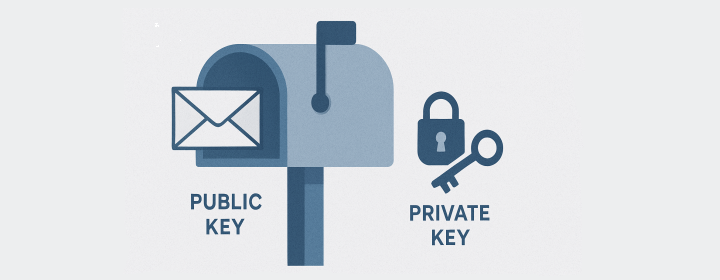
1.1 Public Key → The Mailbox
Imagine a mailbox in front of a house.
- The public key is the mailbox itself.
- Anyone who knows your address can see it and drop letters inside.
- Putting a letter in the box is like encrypting data with the public key, everyone can do it, but no one can read what’s inside.
Seeing the mailbox doesn’t reveal its contents; it just tells people where to deliver a message safely. That’s why public keys are shared openly.
1.2 Private Key → The Mailbox Key
The private key is the key that opens that mailbox.
- The homeowner keeps it hidden and never shares it.
- Only this key can open the box and read the letters.
- In technical terms, only the private key can decrypt messages that were encrypted with its matching public key.
If someone steals the private key, they can open the mailbox and read everything. That’s why private keys must stay secret.
1.3 Why the Server Needs to Prove Itself
So far, this describes one-way privacy: the client (browser) can send a secret message that only the server can read.
But there’s another problem: How does the client know it’s talking to the real server and not a fake one pretending to be it?
Let’s extend the analogy.
After reading the client’s letter, the server writes a reply and slides it through a slot in the door. The client receives it, but how can it be sure that the real server wrote it, not some random person inside the house?
1.4 Private Key as a Wax Seal → Digital Signature
Imagine the server owns a special wax seal stamp that no one else in the world has.
- When the server writes a reply, it seals the envelope with that unique wax mark.
- Anyone who knows what the seal should look like (the public key) can check it.
- If the seal matches perfectly, the receiver knows two things:
- It was stamped by the real owner of the seal (authentication).
- The letter hasn’t been changed since it was sealed (integrity).
In technology terms, that wax seal is a digital signature, which is created with the private key and verified using the public key.
Keep these two truths in mind:
- Encrypt with the public key → only the matching private key can open it.
- Sign with the private key → anyone with the matching public key can verify who sent it and that it hasn’t been altered.

2. Certificate — The Digital ID Card
Now you might wonder: “How does the client know the public key it received really belongs to the real website?”
That’s where certificates come in.
A certificate is like a verified ID card that says:
“This public key belongs to example.com, and a trusted Certificate Authority (CA) has confirmed it.”
A certificate includes:
- The website’s public key
- The domain name it belongs to
- A digital signature from the CA (proving the CA verified the information)
Your browser already trusts a list of well-known CAs. When a website presents its certificate, the browser checks the CA’s signature to ensure the certificate hasn’t been forged.
If you ask, “Why trust the CA?”. It’s because:
- CAs are recognized, audited authorities built into every major browser and OS.
- They verify that you truly control the domain before issuing a certificate (for example, by asking you to create a DNS record or host a special file), which only the real owner can do.
So, a certificate is basically:
Public key + identity information + trusted signature → proving that this key really belongs to the website you wanted to reach.
3. When to Encrypt vs When to Sign
📦 Encrypt = Secret Delivery
- Goal: Keep the message private.
- How: The client locks the message with the server’s public key.
- Effect: Only the server’s private key can open it.
- Story: You drop a secret letter in the mailbox; only the homeowner’s key can open it.
✍️ Sign = Prove Who Sent It and That It Wasn’t Changed
- Goal: Provide authenticity and integrity.
- How: The server stamps the message with its private key (digital signature).
- Effect: Anyone with the public key can verify it really came from the server and wasn’t altered.
- Story: The server seals the reply letter with its unique wax stamp. The client checks the stamp and knows it’s genuine.
4. ⚙️Extend: In Real HTTPS
HTTPS is the most common real-world example that uses keys and certificates, how do these pieces fit together?
- The public/private key pair ensures secure encryption and signing.
- The certificate proves that the public key truly belongs to the website.
- The browser verifies this chain before any data is exchanged.
That’s the heart of how HTTPS keeps your connection private, authentic, and tamper-proof.
4.1 HTTPS at a Glance
Key points:
- The certificate ties the server’s public key to its domain.
- The client protects a one-time session secret with the server’s public key.
- Only the server can open it with its private key.
- Both switch to symmetric crypto for speed.
5. Where else You Will See This
- SSH for secure shell logins
- Package and OS updates verified with signatures
- JWT and OAuth where tokens are signed and verified
- Email security like S/MIME or PGP
6. TL;DR
- Public key is the mailbox. Anyone can drop encrypted letters in.
- Private key is the only key that opens that mailbox.
- Private key also stamps signatures. Public key lets everyone verify the stamp.
- Certificates attach a trusted identity to a public key.
- Encrypt when you want secrecy. Use the receiver’s public key so only the receiver’s private key can open it.
- Sign when you want authenticity and integrity. Use your private key so anyone with your public key can verify it was you and it was not altered.
- In real systems, both are often used together. For example, a client might verify the server using a certificate and then send a session secret encrypted with the server’s public key. The client might also authenticate by signing a challenge with its own private key.
Enjoyed this article? Support my work with a coffee ☕ on Ko-fi.
